
An export of a million records can fail in two ways. The pod can run out of memory while it writes, or the export can produce a file that is too large to open. We measured both, and this article reports the numbers. The memory was measured under the same limit that the pod runs with, and the read rate comes from real exports on our test system, on the MAS 9.2 series.
How we measured a million records#
Our test system holds only about 1,200 assets, so the million records came from a synthetic reader. The rest was the real export:
- The real engine. The reader feeds the same spool, writer and splitter that a job uses.
- A real layout. The asset layout Records with 163 columns, generated from the metadata of our test system, with values of each column’s type.
- The pod’s runtime and limit. The run used Bun, the runtime of the pod, inside a container limited to 512 MiB, the memory limit of the pod. We sampled the memory every 0.2 seconds, and at the end we read whether the kernel had killed the process.
- A control. The same run under a limit of 128 MiB was killed, as it should be. So the measurement can fail, and a pass means something.
The numbers#
| Run | Peak memory | Result |
|---|---|---|
| A million records | 315 MiB | finished, six files |
| A million records, at most 500,000 rows per file | 346 MiB | finished, six files |
| Two jobs of a million records at once | 380 MiB | finished, six files each |
| The server, idle | 24 MiB | |
| The control, limited to 128 MiB | 119 MiB | killed by the kernel |
Two jobs at once is the most that the pod runs by default; a third one waits in the queue. Even then, the two jobs and the idle server together stayed well below the pod’s limit of 512 MiB.
Why a million records became six files#
By count, a million records fit one file: the default limit is a million rows per file. They became six files anyway, because two other limits come first.
- The zip format. An
.xlsxfile is a zip archive, and without the zip format’s extension for large files, one entry stops at 4 GiB. - The import’s read limits. By default, Fiedler Data Import reads at most 1 GiB of XML and 50 million cells per workbook.
So the engine estimates the size and the number of cells of every record from above. It starts a new file before a file would pass one of these limits, and always at a record boundary, so a record and its related rows stay together. The six files held between 157,800 and 169,365 rows each, with 939 MB of XML per file. Every one of them opened in Fiedler Data Import at its default limits.


The option Rows per file splits earlier, for people who want smaller files. The picture shows a
real export of 1,326 work orders from our test system, at 500 rows per file: three files, numbered
_1 to _3, written in less than half a minute. Every file has the same header rows, so each one
imports on its own.
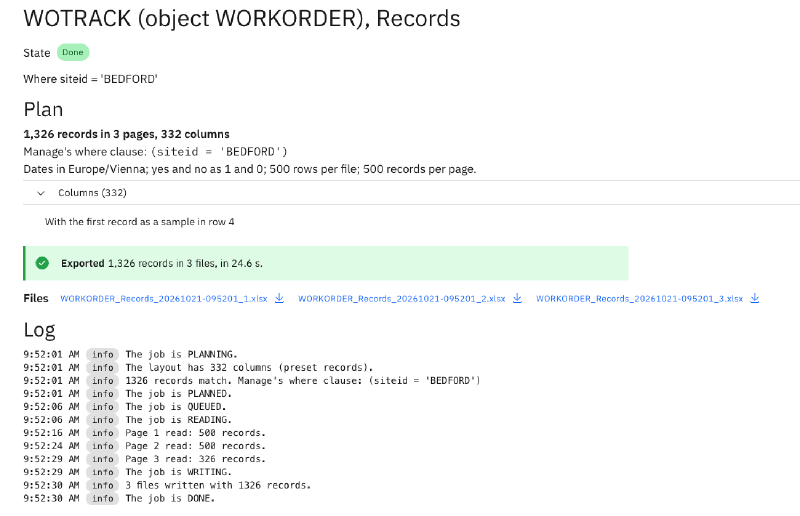
A file that fails while it is written leaves nothing behind in the job’s folder. So every file in a job’s list is complete.
The read rate#
The export reads Manage page by page. On our test system, we exported the same selection of 5,680 work orders at page sizes from 100 to 5,000 records. Every run read between 70 and 86 records per second, so the page size hardly changes the rate. A large page only made the first page arrive later, and the progress on the screen start later. The default stays at 500 records per page.
At that rate, a million records read for hours. That is why a large export runs as a job in the background. It keeps its records in the spool on the app’s data volume, so it survives a restart of the pod, it stays in History, and a stopped job resumes where it stopped.
What comes next#
The last article of the series is about running the export: the install and removal from the administration screen, nightly exports, retention, and monitoring. The Fiedler Data Export page lists the whole series.
Want to see how the export handles your largest objects? Get in touch.
IBM and Maximo are trademarks of International Business Machines Corporation, registered in many jurisdictions worldwide.