
Fiedler Data Export has two ways into IBM Maximo Manage. Most exports use the first one, and many teams never need the second. The second one exists for teams whose object structures already decide what may leave Manage.
This article explains both paths and when each one fits. Then it shows why the Export page checks a layout against an object structure before the plan, and how both paths end in the same workbook. We checked the behaviour on our test system, on the MAS 9.2 series.
Two paths into Manage#
On the Export page, the read path is a choice. The business object path, or MBO path, is the
default. A user with the option OSPATH can choose one of the object structures of the target
instead.


| Business object path | Object structure path | |
|---|---|---|
| How it reads | Through the export’s own automation script inside Manage | Through Manage’s REST API and the structure you choose |
| What it reads | Every attribute, every relationship and chains of them, other languages, long descriptions and specification sheets | The structure’s attributes, and its children one level deep |
| The condition | An SQL where clause, as in Manage | OSLC syntax, such as siteid="BEDFORD" |
| Who may use it | Everyone who may export | Users with the option OSPATH, who may also read the structure’s application |
A saved query works on both paths. On the structure path, Manage refuses an SQL clause, so the Export page explains the OSLC form right below the field.
When the structure path fits#
The business object path reads everything an export can hold, so it is the right start for almost every job. The structure path fits a narrower case. An integration team often maintains object structures that define exactly what may leave Manage: which attributes a structure leaves out, and which children it carries. When the export reads through such a structure, it follows that definition and the rights of the structure’s application. Nobody has to keep a second list in the export.
The page checks the layout first#
A structure does not carry every child of an object. Manage answers a request for a child that the structure lacks without an error, and with no rows. On its own, that would give a sheet that stays empty in silence.
So the Export page checks the layout against the structure before the plan. It goes through every sheet and every column, greys each one the structure cannot read, and says why. Where another structure of the object carries a missing relationship, the page names it. The button that plans the export stays disabled until the layout fits.
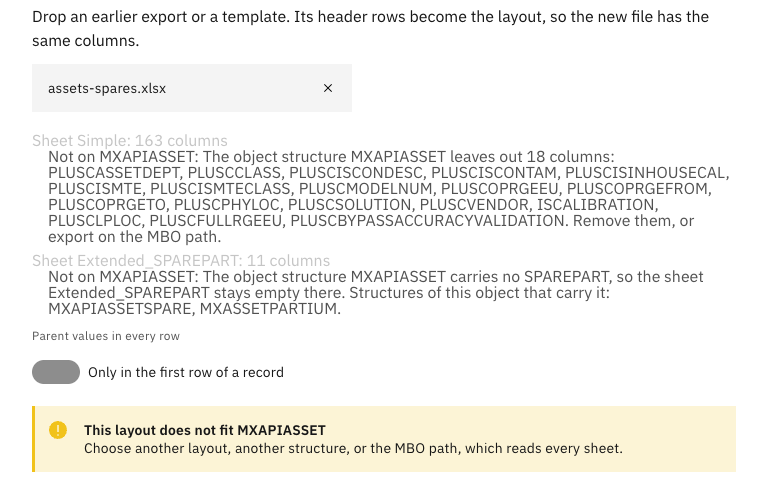
Two details make the check honest:
- A structure picks its own relationship to a child. The asset structure in the picture carries the meters under a relationship of its own. A sheet fits a child when its relationship reads the same rows: the same object under the same condition.
- A definition can promise a column that never arrives. Some columns are part of a structure and still never come back in its answers. So the check also reads one page of records, and a preset leaves such columns out.
The same cells on both paths#
The structure’s answer has its own form. It leaves empty values out, writes a date as midnight in Manage’s time zone, and writes a yes or no as true or false. The export asks Manage for the empty values too, and it turns every value into the cell that the business object path writes for it.
Our tests check that in every build: the same records, read through an asset structure, give the same cells as on the business object path. Round-trip cases also read through the structure, and their files import back with every row unchanged, as in the first article of this series. Both paths page through the records by their unique id, so a stopped export resumes on either path.
What comes next#
The next article is about size: what happens when an export holds a million records, and why a large export splits into several files. The Fiedler Data Export page lists the whole series.
Want to see the structure path on your own object structures? Get in touch.
IBM and Maximo are trademarks of International Business Machines Corporation, registered in many jurisdictions worldwide.