

MAS Data Import
Table of Contents
MAS Data Import brings data from Excel workbooks into IBM Maximo Manage, in the Maximo Application Suite (MAS). You upload a workbook, the app plans what each row will do, you look at the plan, and then you run it. The app writes as you, with your own rights, so Manage checks every record as if you had typed it in.
It reads the workbooks of the EAM Data Management Tool and of maximex as they are. A library of import workbooks that took years to build keeps working on MAS. MAS Data Import itself is a new product, written from scratch with its own code base and no Java. What it shares with those tools is the workbook format.
What it does#
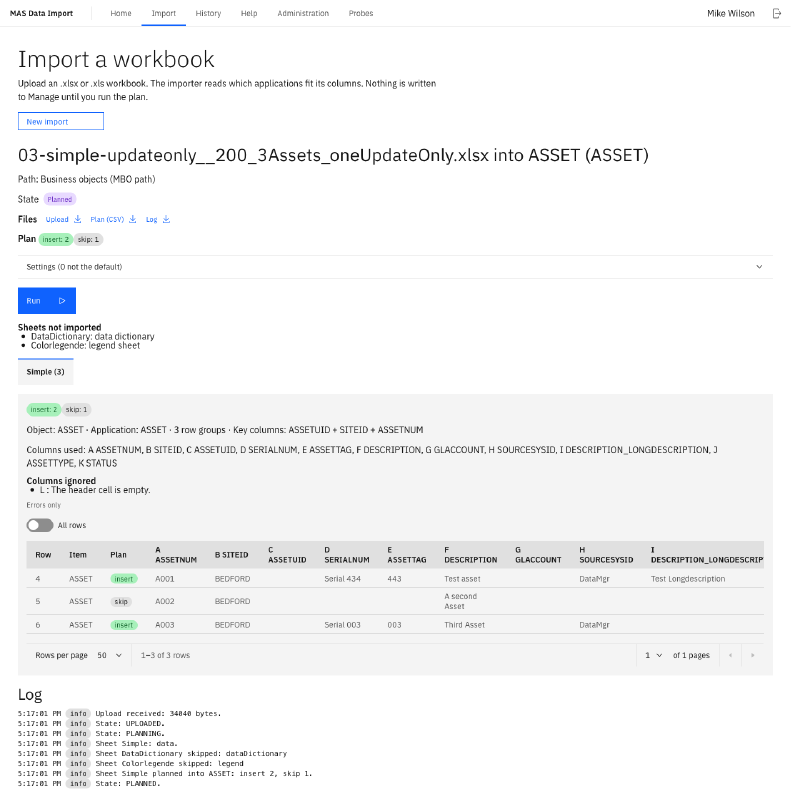
- It plans first. For every row the plan says whether it inserts, updates, deletes or skips a record, or why it cannot. Manage stays untouched until you run the plan.
- It works as you. The app signs you in through MAS. You can change only what Manage lets you change, and every record carries your name in Manage.
- It handles real structures. Main records with their child records in one sheet, such as job plans with their tasks and labor, assets with spare parts, items with their texts in more languages, failure code hierarchies and classification specifications.
- It writes the results back into your workbook. After a run you download your workbook with a result text for every row, and colours on the cells that need a look. Fix the failed rows in place and upload it again.
- It keeps a history. Every job has its log, its files and its result. A job that stopped halfway resumes where it stopped and never sends a row twice.
- It has two ways into Manage. The business object path writes through Manage’s business rules. The object structure path writes through an object structure of your choice, also your own.

How it runs#
MAS Data Import is a companion app: a container in the MAS cluster on OpenShift, next to Manage. Inside Manage it needs four small automation scripts, which it installs itself, and its own application for the rights. It adds no Java code, and it changes none of the existing Maximo applications. An administrator controls it through settings in a ConfigMap, and its metrics feed Prometheus.
For scripts and build servers, a command line client does the same as the screens: upload, plan, run, results and test suites.
Who it is for#
Maximo administrators and data teams who load and maintain master data and configuration in Manage: during a go-live, a migration to MAS, or the daily work. And teams who used the EAM Data Management Tool or maximex on Maximo 7 and want their workbooks to keep working on MAS.
The series#
A series of articles follows MAS Data Import from the idea to the running product:
- Built from scratch for the Maximo Application Suite: the history, and why MAS Data Import is a new tool
- The workbook format: why your old workbooks still import
- A companion app beside Manage: how MAS Data Import fits into MAS
- Plan first, then run
- It works as you: rights, sign-in and what the log keeps
- Results you can act on: colours, write-backs, resume and review
- Four layers of settings, and callbacks
- Measured: 10,000 job plans and a million rows
- Running and scripting it: install, metrics, backup, the command line and test suites
- How we built it: domain knowledge plus AI, and what comes next
The articles appear below as they are published.
Talk to us#
Want to see MAS Data Import on your own workbooks? Get in touch. We work in English and German.
2026