
10,000 job plans, with tasks and labor#
The workbook had two sheets. The first held 10,000 job plans, each with two tasks. The second named the same job plans again, each with two labor lines. That makes 60,000 records to plan. Mike Wilson, a user of the test system, ran the job through the business object path.
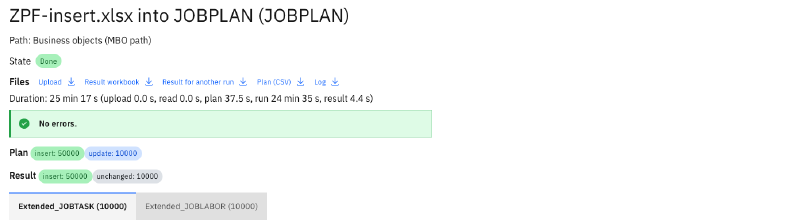
| Stage | Time |
|---|---|
| Plan | 37.5 s |
| Run | 24 min 35 s |
| Result workbook | 4.4 s |
| Whole job | 25 min 17 s |
The job ended without an error. It inserted 50,000 records: the 10,000 job plans, their 20,000 tasks and 20,000 labor lines. The 10,000 job plans on the second sheet read unchanged, because the first sheet had created them by then, as the plan article explains. A count in Manage found the 10,000 job plans.
That is about 34 new records a second, each saved through Manage’s business objects with its rules. While the job ran, the app’s container used at most 97 MiB of its 2 GiB, and Manage’s container peaked at 1,748 MiB. The time goes into Manage’s saves, and the app itself stays light.
Then a second workbook with $DELETE removed the 10,000 job plans with their tasks and labor. It
planned in 43.7 seconds and ran in 17 minutes 20 seconds. Afterwards Manage counted none of them.
A workbook of a million rows#
The second test used a workbook as large as Excel allows: 1,048,576 rows of assets with 15 columns, 94 MB. Its data starts in row 4, so the plan has 1,048,573 rows, each a new asset.
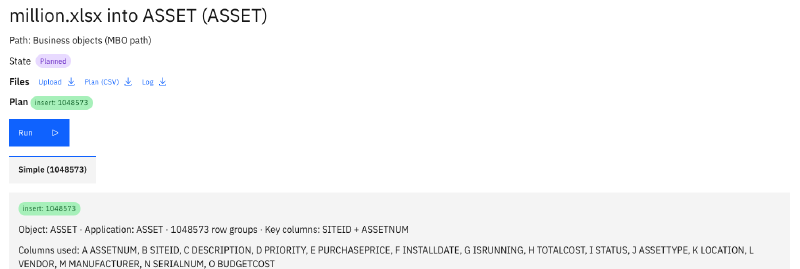
| Stage | Time |
|---|---|
| Upload | 3.6 s |
| Reading the workbook | 1.7 s |
| Plan | 47 min 33 s |
The plan ran inside the app’s container on the test system, with 1.1 to 1.3 GiB of memory in use and no restart. The first attempt ran out of memory at its very end: the plan’s CSV export held the whole sheet at once, about 3 GB. We changed it to write as it reads, which needs 214 MB, and planned again.
We stopped after the plan, because a run would have written a million assets into our test system.
A result workbook of a million rows#
After a run, the app writes the result workbook with a text and colours for every row, as the results article shows. For a million rows, the first version of that step held everything at once and needed 6.8 GB.
The result writer now streams: it reads the sheet, asks for each row’s result, and writes the row. On a copy of the million-row plan, in a container with the app’s 2 GiB limit and the same runtime, it wrote the result in 65 seconds with at most 1,070 MB. The first version died in the same container. Both versions wrote byte-identical files, for the million rows and for our 14 example workbooks.
What the numbers say#
- The app stays light. At 97 MiB during the 10,000 job plans, it leaves its 2 GiB mostly unused, and a million rows fit as well.
- Manage sets the pace. A row group is saved through Manage’s business objects, with every rule and every automation script of yours, and that takes Manage’s time.
- The plan grows with the rows. 60,000 records planned in 37.5 seconds, and a million rows in under an hour.
What we have not measured yet: a run of a million rows, several large jobs at the same time, and the object structure path at this size. When we do, the numbers go here.
What comes next#
The next article is about running MAS Data Import: the installation, the metrics, the backup, the command line and the test suites. The MAS Data Import page lists the whole series.
Want to see how your largest workbook behaves? Get in touch.